Kullanım kılavuzu Hama 00121760 HDMI anahtarı

Hama 00121760 HDMI anahtarı’ınız için bir kılavuza mı ihtiyacınız var? Aşağıda PDF kılavuzunu Türkçe olarak ücretsiz olarak görüntüleyebilir ve indirebilirsiniz. Bu ürün şu anda 1 sık sorulan soru, 0 yorum ve 0 oy var. İstediğiniz kılavuz bu değilse lütfen bizimle iletişime geçin.

Ürününüz kusurlu ve kullanma kılavuzu size bir çözüm sunamıyor mu? O zaman ücretsiz tamir hizmetleri için Repair Café’yi ziyaret edin.

Kullanım kılavuzu

Loading…
3
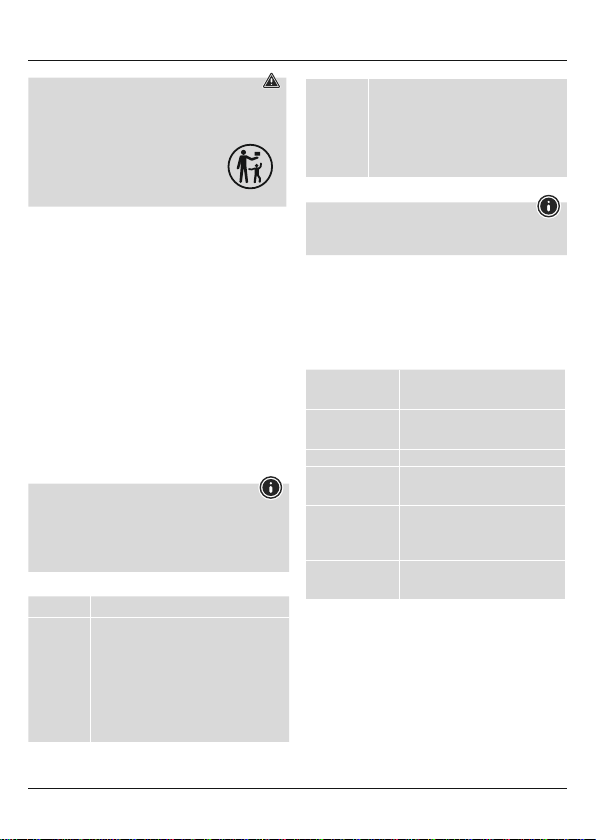
Warning -batteries /button cells
•This product contains button cells. If the button cellis
swallowed, serious internal burns can occur within 2hours
and ultimately lead to death.
•Ifyou suspect that abutton cellhas been
swallowed or is in any part of the body,seek
medical attention immediately.
•Keep new and used button cells out of the
reach of children.
5. Functions
•Easy to switch between up to 3HDMI sources (e.g. Blu-ray/DVD
player,receiver,computer,games console)
•Quick and easy switching using aremote control
•Automatic selection of the input source when switching on
•Noadditional power supply required, the power is supplied via
the connected devices
•Supports 3D and fullHDresolution
6. Gettingstarted and operation
•Connect the source devices (e.g. Blu-ray/DVD player,receiver,
computer,games console) to the HDMI inputs (input 1-3) using
HDMI cables (not included in the delivery package). The LEDthat
corresponds to the active input (1) lights up.
•Now connect your output device (e.g. TV,projector,monitor)
to the HDMI outputs using HDMI cables (not included in the
delivery package).
•Turn on the connected devices. The power LED (2)lights up.
•You can now select allinputs via the remote control (6).
•Itisalso possible to select the source directly on theHDMI
switching desk using the Select button (4).
Information about the power supply
In some cases, it may be necessary to provide theHDMI
switching desk with additional power via the USB socket (5). To
do this, connect amicroUSB /USB cable to the USB socket(5)
and afreeUSB port on your TV or aUSB power adapter (5 V/
100 mA, not included in the delivery package).
7. Troubleshooting
Problem Solution
No picture•Ensurethat allcables arecorrectly connected.
•Check to be surethat alldevices are
switched on.
•Make surethat the TV is set to the correct
channel.
•Connect the HDMI switch to the USB power
supply.
•Insome cases, it may be necessary to provide
the HDMI switching desk with additional
power via the USBsocket (5).
Poor picture,
audio inter-
ruptions
•Ensurethat allcables arecorrectly connected.
•Try to connect theHDMI source directly to the
outputdevice. If nothingchanges,you need to
replace thesource device.
•Use a1.4 HDMI cable
•Your HDMI cable should not exceed atotal
length of 5m.
•Switch alldevices off andthen on again.
8. Care and Maintenance
Note
Disconnect the device from the power supply beforecleaning it
or if it is not goingtobeused for alongperiod of time.
Only clean this product with aslightly damp, lint-free cloth and do
not use aggressive cleaning agents.
9. Warranty Disclaimer
Hama GmbH &Co. KG assumes no liability andprovides no
warranty for damage resulting from improper installation/mounting,
improper use of the product or from failuretoobserve the operating
instructions and/or safety notes.
10. TechnicalData
Connections
3HDMI inputs
1HDMI output
Supported
resolutions
480i/480p/576i/576p/720p/
1080i/1080p
HDCP version
Compatible with HDCP 1.4
Supported audio
formats
LPCM, Dolby-AC3, DTS7.1, Dolby
True HD, DTS-HD master audio
Source
selection
Manually via the button on the
device,automatically when swit-
ching on or via remote control
Power supply
From source device (HDMI input)
viaUSB (5 V/500 mA)
Türkçe kullanım kılavuzunu indir (PDF, 0.56 MB)
(Çevreyi düşünün ve sadece çok gerekli olması halinde bu kullanma kılavuzunu yazdırın)

Loading…

Derecelendirme

Bir ürün derecelendirmesi yaparak Hama 00121760 HDMI anahtarı hakkındaki düşüncelerinizi bize bildirin. Bu ürüne ilişkin deneyimlerinizi paylaşmak veya bir soru sormak ister misiniz? Lütfen sayfanın alt kısmında bir yorum bırakın.
Hama 00121760 HDMI anahtarı’den memnun musunuz?
Evet Hayır
Bu ürünü derecelendiren ilk kişi siz olun
0 oylar

Bu ürün hakkındaki sohbete katıl

Burada Hama 00121760 HDMI anahtarı hakkında ne düşündüğünüzü paylaşabilirsiniz. Bir sorunuz varsa öncelikle kılavuzu dikkatlice okuyun. Kılavuz talebinde bulunmak için iletişim formumuzu kullanabilirsiniz.

Bu kılavuz hakkında daha fazla bilgi

Hama 00121760 HDMI anahtarı cihazınız için basılı bir kılavuza sahip olmanın güzel bir şey olduğunun farkındayız. Kılavuzu her zaman web sitemizden indirebilir ve kendiniz yazdırabilirsiniz. Orijinal bir kılavuza sahip olmak istiyorsanız Hama ile iletişime geçmenizi öneririz. Orijinal bir kılavuz sağlayabilirler. Hama 00121760 HDMI anahtarı cihazınızın kılavuzunu farklı bir dilde mi arıyorsunuz? Ana sayfamızdan tercih ettiğiniz dili seçin ve mevcut olup olmadığını görmek için model numarasını arayın.

Özellikler

Marka Hama
Modeli 00121760
Kategori HDMI anahtarları
Dosya tipi PDF
Dosya boyutu 0.56 MB

Hama HDMI anahtarları için tüm kılavuzlar
HDMI anahtarları ile ilgili daha fazla kılavuz

Hama 00121760 HDMI anahtarı hakkında Sıkça Sorulan Sorular

Destek ekibimiz faydalı ürün bilgileri arar ve sıkça sorulan soruları cevaplar. Sıkça sorulan sorularda hatalı bir cevaba rastlamanız halinde lütfen bunu iletişim formunu kullanarak bize bildirin.

HDMI ne anlama geliyor? Doğrulanmış

HDMI, Yüksek Çözünürlüklü Multimedya Arayüzü anlamına gelir. HDMI, bir cihazdan diğerine yüksek kaliteli video ve ses göndermek için kullanılan bir bağlantıdır.

Bu faydalıydı (8) Devamını oku
Kullanım kılavuzu Hama 00121760 HDMI anahtarı

İlgili ürünler

İlgili kategoriler

×
Download