Kullanım kılavuzu Logitech Universal Folio Klavye

Logitech Universal Folio Klavye’ınız için bir kılavuza mı ihtiyacınız var? Aşağıda PDF kılavuzunu Türkçe olarak ücretsiz olarak görüntüleyebilir ve indirebilirsiniz. Bu ürün şu anda 2 sık sorulan soru, 2 yorum ve ortalama 0/100 ürün puanıyla 1 oyu var. İstediğiniz kılavuz bu değilse lütfen bizimle iletişime geçin.

Ürününüz kusurlu ve kullanma kılavuzu size bir çözüm sunamıyor mu? O zaman ücretsiz tamir hizmetleri için Repair Café’yi ziyaret edin.

Kullanım kılavuzu

Loading…
3 English
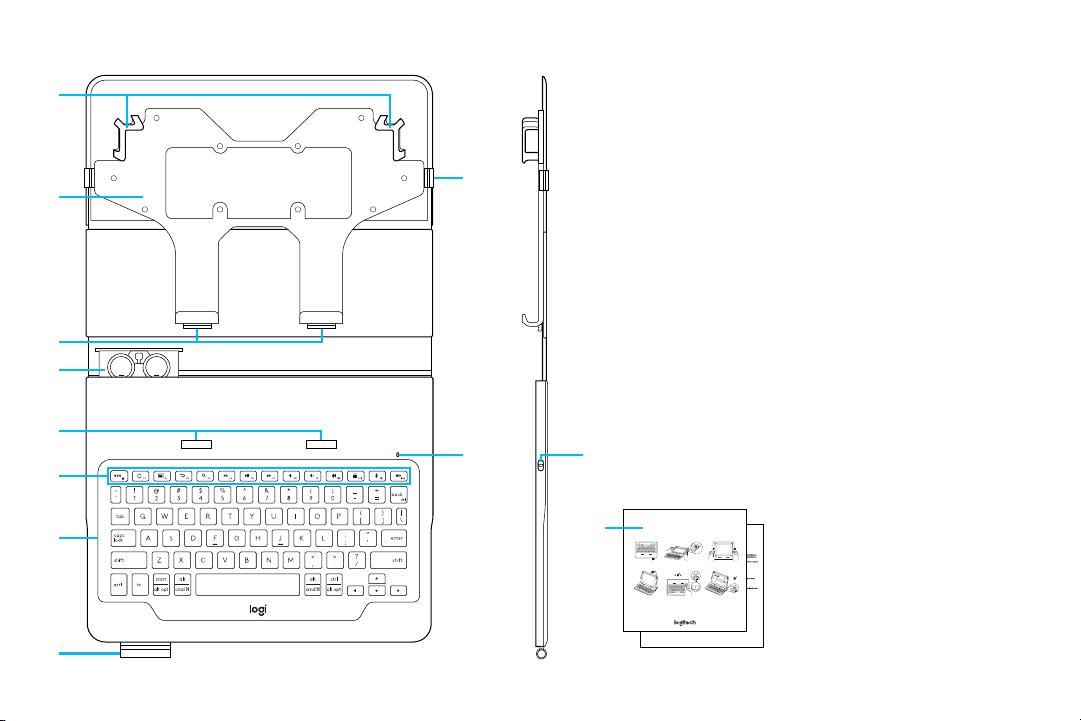
KNOW YOUR PRODUCT
1 Expandable holders
2 Universal holder
3 Hooks
4 Battery holder
(two lithium coin batteries pre-installed)
5 Lifting slots
6 Hot keys
7 Keyboard
8 Stylus holder
9 Closing band
10 Bluetooth
®
and battery status light
11 On/o button
12 Product documentation
1
4
2
3
6
7
8
9
10 11
5
Important Safety, Compliance and Warranty Information
Informations importantes concernant la curité,
la mise en conformité et la garantie
English
Read Manual Before Product Use.
BATTERY WARNING!: Improperly replaced batteries may present a risk of leak or
explosion and personal injury. Mistreated rechargeable batteries may present a risk
of fire or chemical burn. Do not disassemble or expose to conducting materials,
if it appears to be leaking, discolored, deformed, or in any way abnormal. Do not
leave your battery discharged or unused for extended periods. Do not short circuit.
Battery life varies with usage. Non-operational batteries should be discarded
according to local laws. If no laws or regulations govern, dispose of your device
WARNING! The power supply is for indoor use only. Only use the power supply
included with your product. Do not attempt to repair or use a damaged power
supply. Do not immerse the power supply in water or subject it to physical abuse.
Inspect the power supply regularly for cable, plug, and casing damage.
Use Guidelines: Safe & Proper Use of Your Product
Do not open or modify the product except for battery removal and replacement.
Do not disassemble or attempt to service this product.
Use only Logitech-provided power supply devices with this product. Do not
modify the power supply. Do not charge your product during an electrical storm.
This is not a Children’s Product and is not intended for use by children under
14 years old.
If product is operating improperly, call Logitech support.
Product must be returned to the manufacturer for any service or repair.
Long periods of repetitive motion using the product may be associated
with nerve, tendon or muscle injury in your hands, wrists, arms, shoulders,
neck or back. See a qualified health professional for pain, numbness,
at www.logitech.com/comfort.
This product is safe under normal and reasonably foreseeable misuse operating
conditions. If the product is operating improperly, contact Logitech support.
Product must be returned to Logitech for any service or repair.
Any changes or modifications to the product that are not expressly
approved by Logitech may void the users authority to operate the equipment
and your warranty.
Refer to product Quick Start Guide for use instructions.
Logitech Compliance. For Product Safety, EMC and RF information, go to
www.logitech.com/compliance. Maintenance is not required for product compliance.
FCC statement
This device complies with Part 15 of the FCC Rules. Operation is subject to
digital device, pursuant to part 15 of the FCC Rules. These limits are designed
to provide reasonable protection against harmful interference in a residential
installation. This equipment generates , uses and can radiate radio frequency
energy. And, if not installed and used in accordance with the instructions, may cause
harmful interference to radio communications. However, there is no guarantee that
interference will not occur in a particular installation. If this equipment does cause
harmful interference to radio or television reception, which can be determined
Reorient or relocate the receiving antenna.
Increase the separation between the equipment and receiver.
the receiver is connected.
Consult the dealer or an experienced radio/TV technician for help.
Warning: Where shielded interface cables or accessories have been provided with
the product or specified additional components or accessories elsewhere defined to
be used with the installation of the product, they must be used in order to ensure
compliance with FCC. Changes or modifications to product not expressly approved
by Logitech, Inc could void your right to use or operate your product by the FCC.
IC statement : CAN ICES003- (B) / NMB003- Class (B)
This device complies with Industry Canada licence-exempt RSS standard(s).
Operation is subject to the following two conditions: (1) this device may not cause
interference, and (2) this device must accept any interference, including interference
that may cause undesired operation of the device.
Cordless (Radio Transmitter) products: Section A. RSS27) 310- MHz transmitters
and receivers): This Category II radio communication device complies with
Industry Canada Standard RSS310-. Section B. RSS2.4) 210- GHz transmitters or
transceivers): This Category I radio communication device complies with RSS210-
of Industry Canada.
12
UNIVERSAL FOLIO
Setup Guide
|
Guide d’installation
MX: FAVOR DE LEER EL INSTRUCTIVO
ANTES DE INSTALAR Y OPERAR
EL PRODUCTO
2s
Universal Folio
1
4
2
5
3
6
Türkçe kullanım kılavuzunu indir (PDF, 33.35 MB)
(Çevreyi düşünün ve sadece çok gerekli olması halinde bu kullanma kılavuzunu yazdırın)

Loading…

Derecelendirme

Bir ürün derecelendirmesi yaparak Logitech Universal Folio Klavye hakkındaki düşüncelerinizi bize bildirin. Bu ürüne ilişkin deneyimlerinizi paylaşmak veya bir soru sormak ister misiniz? Lütfen sayfanın alt kısmında bir yorum bırakın.
Logitech Universal Folio Klavye’den memnun musunuz?
Evet Hayır
0%
100%
1 oy

Bu ürün hakkındaki sohbete katıl

Burada Logitech Universal Folio Klavye hakkında ne düşündüğünüzü paylaşabilirsiniz. Bir sorunuz varsa öncelikle kılavuzu dikkatlice okuyun. Kılavuz talebinde bulunmak için iletişim formumuzu kullanabilirsiniz.

Holke J.M. Flapper 14-09-2024
Özel karakterlerin ve tuşların kullanımına ilişkin talimatları nerede bulabilirim? Yalnızca klavye kısayollarının kısa bir listesini görüyorum. Bilgi için çok teşekkür ederim

cevapla | Bu faydalıydı (0) (Google tarafından çevrildi)
Michel 13-05-2026
iPad'im klavyenin üzerine düştü ve artık bağlanamıyorum veya eşleşemiyorum. Görünüşe göre klavyem artık çalışmıyor. Birisi bana yardım edebilir mi

cevapla | Bu faydalıydı (0) (Google tarafından çevrildi)

Bu kılavuz hakkında daha fazla bilgi

Logitech Universal Folio Klavye cihazınız için basılı bir kılavuza sahip olmanın güzel bir şey olduğunun farkındayız. Kılavuzu her zaman web sitemizden indirebilir ve kendiniz yazdırabilirsiniz. Orijinal bir kılavuza sahip olmak istiyorsanız Logitech ile iletişime geçmenizi öneririz. Orijinal bir kılavuz sağlayabilirler. Logitech Universal Folio Klavye cihazınızın kılavuzunu farklı bir dilde mi arıyorsunuz? Ana sayfamızdan tercih ettiğiniz dili seçin ve mevcut olup olmadığını görmek için model numarasını arayın.

Özellikler

Marka Logitech
Modeli Universal Folio
Kategori Klavyeler
Dosya tipi PDF
Dosya boyutu 33.35 MB

Logitech Klavyeler için tüm kılavuzlar
Klavyeler ile ilgili daha fazla kılavuz

Logitech Universal Folio Klavye hakkında Sıkça Sorulan Sorular

Destek ekibimiz faydalı ürün bilgileri arar ve sıkça sorulan soruları cevaplar. Sıkça sorulan sorularda hatalı bir cevaba rastlamanız halinde lütfen bunu iletişim formunu kullanarak bize bildirin.

Klavyedeki harfler alıştığım yerlerde değil, niye öyle? Doğrulanmış

Çoğu klavye, klavyedeki ilk altı harfi temsil eden bir QWERTY düzeni kullanır. Bununla birlikte, belirli bir dilin özel gereksinimlerini karşılayan farklı klavye düzenleri vardır. Klavye tuşlarının değiştirilmiş olması da mümkündür. Özellikle eski klavyelerde bunu yapmak kolaydır.

Bu faydalıydı (1358) Devamını oku

Klavyemi temizlemenin en iyi yolu nedir Doğrulanmış

Asla tuşların kenarları arasına herhangi bir nesne sokmayın çünkü bu esas olarak kiri içeri itecek ve klavyeye zarar verecektir. Klavyeyi baş aşağı tutarken klavyeyi basınçlı havayla temizlemek en iyisidir. Tuşların üst kısmı hafif nemli bir bezle temizlenebilir.

Bu faydalıydı (201) Devamını oku

Kullanım kılavuzu Logitech Universal Folio Klavye

İlgili ürünler

İlgili kategoriler

×
Download